PSA Birth Certificate Delivery Delays: Common Reasons and Solutions
You placed your order, completed payment, received your confirmation and now the waiting begins. For most Filipino applicants, a PSA birth certificate ordered online arrives within three to seven business days. But for a significant number of orders every month, the expected delivery window passes without the package appearing at the door. Sometimes the tracking status stops updating. Sometimes the order stays stuck in “Document Processing” for days longer than it should. Sometimes the courier attempts delivery and nobody is home. Understanding exactly why PSA birth certificate deliveries get delayed and what to do the moment you realize something is off is what separates a frustrating multi-week ordeal from a problem that gets resolved in 24 hours. This guide covers every common cause of delivery delay in 2026, what each one means, and the precise steps to take for each scenario.
How PSA Birth Certificate Delivery Works
Before troubleshooting any delay, understanding the complete delivery pipeline helps you identify exactly where in the process your order has stalled.
When you place an order through PSA appointments, your request moves through these stages:
Stage 1 Payment Verification: Your payment is confirmed by the system. Orders do not enter processing until payment posts. Instant payment methods like GCash and Maya post immediately. Over-the-counter bank payments can take 24 to 48 hours.
Stage 2 Document Processing: PSA staff retrieve your civil registry record from the national database, print it on security paper, apply the dry seal, and package the document. This stage typically takes two to three business days for records that are already digitized.
Stage 3 Courier Handover: The completed document is endorsed to PSA appointments’s authorized courier partner for dispatch. You receive a notification at this stage, and a courier tracking link becomes available.
Stage 4 Last-Mile Delivery: The courier delivers the package to your registered address. A signature from an authorized adult is required upon receipt.
Delays can occur at any of these four stages. Identifying which stage is affected tells you exactly who to contact and what information to provide.
Reason 1: Record Requires Manual Retrieval
The most common cause of processing delays particularly for orders that sit in “Document Processing” status for more than three business days is that the civil registry record is not fully digitized and requires manual retrieval from physical archives.
Not all Philippine birth records are immediately accessible in PSA’s central digital database. Records that may require manual retrieval include:
- Births registered before the 1990s, particularly from rural and provincial municipalities
- Records from areas affected by calamities or poor civil registry infrastructure historically
- Records that were registered on paper and have not yet been scanned and encoded
- Documents with corrections or annotations that require additional verification
When manual retrieval is needed, PSA staff must physically locate the original paper or microfilm record, verify it, and then process the certificate from that source. This adds approximately 10 to 15 extra business days to the standard processing timeline.
What to do: PSA appointments will notify you by email or SMS if your order requires manual retrieval. If your order has been in “Document Processing” for more than five business days without any notification, contact PSA appointments customer support PSA appointments with your reference number. Ask specifically whether your record requires manual retrieval and request an estimated completion date.
Reason 2: Incorrect or Incomplete Delivery Address
An incorrect delivery address is the most common cause of failed delivery attempts and returned packages. Because PSA documents are delivered by courier to the exact address registered in your order, even a small error, a missing barangay, a wrong street number, or an incomplete condominium unit can send the courier to the wrong location entirely.
Common address errors that cause delivery failures:
- Missing floor number or unit number for apartment and condominium addresses
- Using a landmark description instead of a full street address
- Entering the wrong barangay or city
- Using an old address that you have since moved away from
- Abbreviations or informal names that the courier’s routing system does not recognize
What to do: If your order is still in “Document Processing” status, contact PSA appointments immediately and request an address correction before the package is dispatched. Once the document has been handed to the courier, address changes are generally not possible mid-shipment.
If the package has already been dispatched to an incorrect address, contact PSA appointments with your reference number and explain the situation. The customer support team will coordinate with the courier to investigate and advise on the next steps which may include redelivery or reprocessing.
For all future orders, take an extra two minutes to verify every field of your delivery address before submitting. Confirm the complete street address, barangay, city or municipality, province, and zip code. For condominiums and apartments, include the building name, floor number, and unit number.
Reason 3: No Authorized Person Available to Receive the Package
PSA birth certificates are delivered as physical packages requiring an adult signature upon receipt. The courier will not leave the package unattended, with a security guard who is not explicitly authorized, or with a minor. If no one is available at the registered address during the delivery attempt, the courier logs a failed delivery and may attempt a second delivery on the following business day.
Most courier partners make one to two delivery attempts before returning the package to the originating facility. If both attempts fail, the package is marked as undeliverable and returned to PSA.
What to do: If you receive a notification that a delivery attempt was made but failed, act immediately. Contact PSA appointments customer support and request a redelivery coordination you can specify a preferred delivery date and confirm that someone will be home. If the courier partner provides a tracking number, contact them directly to arrange a pickup at their facility if a redelivery cannot be scheduled quickly enough for your timeline.
To prevent this in future orders, provide a delivery address where a trusted adult is reliably present during business hours at your workplace, a family member’s home, or a neighbor who has agreed to receive on your behalf.
Reason 4: Order Stuck in “Document Processing” Due to No Record Found
If the personal details submitted in your order do not match what is in PSA’s civil registry database, the system cannot locate the record. This results in a processing hold where your order neither moves forward nor is immediately cancelled; it simply stays in “Document Processing” status while the system or support staff attempt to resolve the mismatch.
Common mismatches that cause this:
- A name spelled slightly differently from how it appears in the civil registry even a single letter difference
- An incorrect birth year a common error when applicants rely on memory rather than verifying against an existing document
- A wrong province or municipality of birth
- Mother’s maiden name entered incorrectly
What to do: Contact PSA appointments customer support and ask whether the hold is related to a No Record Found result. If it is, you have two options:
First, provide corrected details if you identified the error, share the correct information with customer support so they can attempt a new database search against your order.
Second, if the record genuinely does not exist in PSA’s database, your order cannot be fulfilled. In this case, coordinate with the Local Civil Registry of the birthplace to locate the paper record and have it transmitted to PSA. This process takes time, but it is the only path forward for records that are not yet digitized.
Before your next order, verify the exact details against an older PSA copy, a Philippine passport, or school records. Do not rely on memory for name spellings, birth years, or provincial details.
Reason 5: Peak Season Processing Backlogs
The months of April, May, and June generate the highest volume of PSA document requests in the country, driven by the annual school enrollment season. During this period, PSA processes significantly more orders simultaneously than in other months and both processing and delivery timelines extend accordingly.
A standard order that takes three business days to process in September may take five to seven business days during enrollment season. Courier delivery windows extend by similar margins as delivery volumes peak across the country.
What to do: If you placed your order during enrollment season and your timeline has extended beyond what was indicated at checkout, allow an additional three to five business days before escalating. Monitor your order status on the PSA appointments portal and wait for courier dispatch notifications.
To avoid this situation in future years, place orders for birth certificates you know you will need for enrollment at least four to six weeks before the school enrollment period opens. PSA birth certificates do not expire, so having a current copy on hand well before you need it eliminates any enrollment-season anxiety entirely.
Reason 6: Payment Not Yet Confirmed
Orders placed using payment methods that do not post instantly remain in a pending state until payment is confirmed. Over-the-counter bank payments via BancNet ATM and some DragonPay partner channels can take 24 to 48 hours to reflect in the PSA appointments system. During this window, the order has not entered processing; it is simply waiting for the payment to appear.
What to do: If your order status shows “Waiting for Payment” or has not moved to “Order Paid” within 48 hours of payment, contact PSA appointments with your order reference number and proof of payment, a receipt photo or transaction confirmation number. Customer support can manually verify and confirm the payment to move your order into processing.
For future orders, paying via GCash or Maya eliminates this waiting period entirely. Both methods post instantly, and your order enters the processing queue within minutes of payment.
Reason 7: Courier System Delays and Routing Issues
Even after your document has been dispatched from PSA’s facility, delays can occur within the courier’s logistics network. Common causes include:
- Sorting facility backlogs during periods of high shipment volume
- Weather-related disruptions typhoons, flooding, and severe weather during the June to October season affect delivery routes across the Philippines
- Vehicle or manpower shortages in specific regions
- Remote or island addresses that require additional routing time beyond standard provincial estimates
- Packages mis-sorted to the wrong regional facility
What to do: Use the courier tracking link available in your PSA appointments order details to check the real-time status of your shipment. If tracking shows no movement for more than three business days after dispatch, contact PSA appointments customer support and request that a tracer be filed with the courier partner. A tracer is a formal inquiry to locate a package within the logistics network.
Keep your reference number and courier tracking number ready when contacting support. The more information you can provide, the faster the investigation can proceed.
Reason 8: Package Returned to Sender
If multiple delivery attempts fail, or if the courier determines that the address is undeliverable, the package is marked as “Return to Sender” and sent back to the PSA or courier facility. This is one of the more frustrating outcomes because it resets your waiting time but it does not mean your order is cancelled.
Common triggers for package returns:
- Multiple failed delivery attempts with no one home
- Courier unable to locate the address
- Address confirmed as incorrect or non-existent
- Delivery area outside the courier’s current service zone due to weather or access restrictions
What to do: Log into your PSA appointments account and check whether the return has been flagged on your order. Contact customer support with your reference number and report the returned package. You will need to provide a corrected or confirmed delivery address for reshipment. Ask customer support whether a redelivery fee applies this depends on whether the return was caused by a courier error or an address issue you provided.
Request that the reshipment be confirmed via SMS or email notification so you can track its progress from dispatch.
Reason 9: Lost or Misrouted Package
While uncommon, packages occasionally get lost or misrouted within the logistics system. Signs that a package may be lost include:
- Tracking status has shown no movement for more than two weeks since dispatch
- The status is inconsistent for example, showing “Delivered” when you never received anything
- The courier tracking number returns an error or cannot be found in the courier’s system
What to do: File a formal complaint with PSA appointments customer support and request that a tracer be filed. A tracer is a formal investigation request submitted to the courier’s operations team to locate the missing shipment. Provide your reference number, courier tracking number, delivery address, and a summary of the tracking history.
If the package is confirmed as lost after investigation, PSA appointments will arrange for a replacement document to be processed and redelivered. Keep all communication records, emails, chat logs, and reference numbers as these may be needed if the investigation takes multiple follow-up contacts to resolve.
How to Track Your PSA Birth Certificate Delivery
Staying informed about your order status is the most proactive way to catch a problem early and address it before it escalates.
Via the PSA appointments portal: Log into your account at PSA appointments.ph or go directly to the order tracking page. Enter your 10-digit reference number and view your current order status. If your order is in “Released” or “Endorsed for Delivery” status, a courier tracking link is available click it for real-time shipment updates from the courier partner.
Via email and SMS: PSA appointments automatically sends notifications to your registered email and mobile number each time your order moves to a new status from payment confirmation through to delivery. Monitor these messages and act immediately on any failed delivery notification.
Via the courier’s tracking system: If a courier tracking number has been provided, go directly to the courier partner’s website and enter the number there for the most detailed, real-time delivery updates.
When to Contact PSA appointments: A Timeline Guide
Knowing when to escalate and when to simply wait prevents unnecessary support contacts while ensuring you act in time when something genuinely needs attention.
| Situation | Recommended Action | When to Escalate |
| Order in “Waiting for Payment” | Verify payment was completed | After 48 hours with no update |
| Order in “Document Processing” | Wait for normal processing | After 5 business days with no movement |
| Order dispatched, no delivery | Monitor courier tracking | After 3 business days in transit with no movement |
| Failed delivery notification | Contact support for redelivery | Immediately within 24 hours of notification |
| Order shows “Return to Sender” | Contact support for reshipment | Immediately upon seeing status |
| No tracking update for 2 weeks | File tracer request | Immediately |
Practical Tips to Prevent Delivery Delays
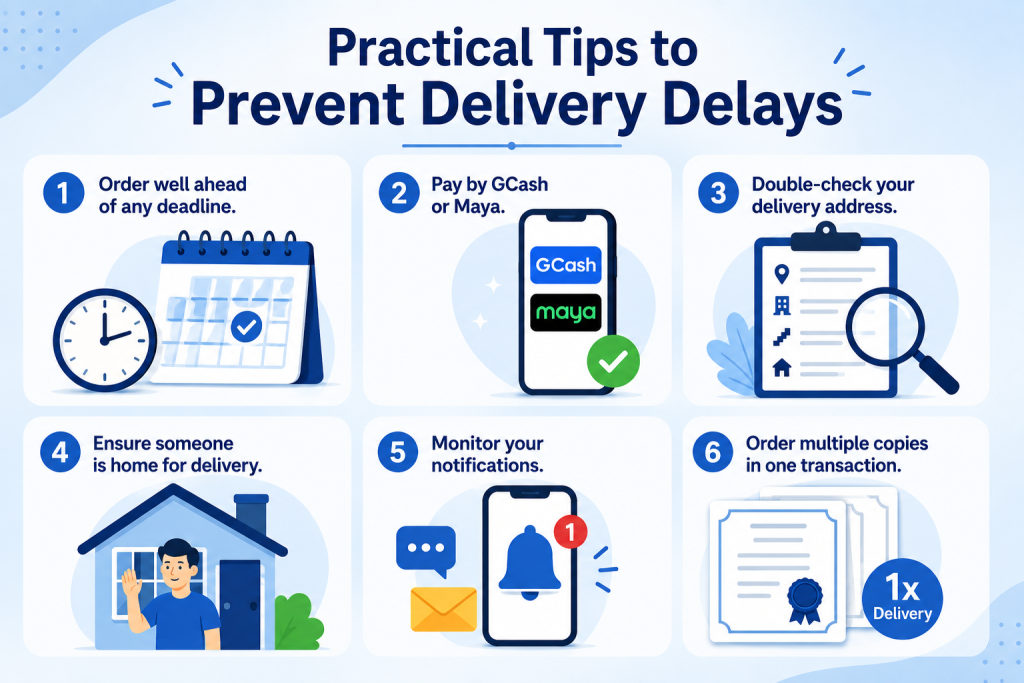
Order well ahead of any deadline. The standard delivery timeline for Metro Manila is three to five business days; provincial addresses take five to ten or more. Adding a buffer of two to three weeks ensures that even a delayed order arrives in time.
Pay by GCash or Maya. Instant payment confirmation moves your order into processing immediately with no 24 to 48-hour payment posting delay.
Double-check your delivery address. Take two minutes to verify every field of your address before submitting your order. For condominiums, include the building name, floor, and unit number.
Ensure someone is home for delivery. Arrange for a trusted adult to be present at your address during business hours on the expected delivery dates. If no one can be there, consider using your workplace address.
Monitor your notifications. Enable email and SMS alerts and check them daily after placing your order. Acting within 24 hours of a failed delivery notification is the difference between a one-day delay and a package returned to the sender.
Order multiple copies in one transaction. If you anticipate needing more than one copy of the birth certificate for school enrollment, employment requirements, and a visa application, for example, order all copies in a single transaction. One delivery covers all copies, and if any issue arises, it affects only one shipment rather than multiple separate orders.
Frequently Asked Questions
My order has been in “Document Processing” for a week with no update. What should I do?
Contact PSA appointments customer support PSA appointments with your reference number. Ask specifically whether the hold is related to a manual retrieval requirement or a No Record Found result. Processing for manually retrieved records adds 10 to 15 business days. If the hold is due to a data mismatch, provide corrected details to support staff.
The courier marked my order as “Delivered” but I never received it. What should I do? Contact PSA appointments immediately and report the discrepancy. Check with household members, building staff, or neighbors first sometimes packages are received by someone else at the address. If no one received it, PSA appointments will coordinate with the courier to investigate. File the report as promptly as possible.
Can I change my delivery address after placing the order?
If your order is still in “Document Processing” status, contact PSA appointments immediately and request an address update before dispatch. Once the document has been handed to the courier, address changes are generally not possible. Address updates can only be made before the courier handover stage.
How many delivery attempts does the courier make?
Most courier partners make one to two delivery attempts before returning the package. If you miss the first attempt, act quickly to contact PSA appointments or the courier directly within 24 hours to arrange a second attempt or a pickup.
What happens to my order if the package is returned to PSA?
A returned package means your document is back at the PSA or courier facility. Contact PSA appointments to arrange reshipment with a corrected or confirmed delivery address. Ask whether an additional redelivery fee applies based on the reason for the return.
Final Thoughts
PSA birth certificate delivery delays are frustrating but in the vast majority of cases, they are also resolvable. Most delays fall into predictable categories: a record that needs manual retrieval, an address error, a failed delivery attempt, or a courier routing issue. Each of these has a clear resolution path, and the sooner you identify which category applies to your order, the faster you can take the right action. The most important habits are simple: track your order regularly, act immediately when a delivery attempt fails, and contact PSA appointments with your complete reference details the moment your order stays stuck beyond the standard processing window. With consistent monitoring and prompt follow-up, even a delayed PSA birth certificate order gets resolved and your document ends up in your hands before the deadline you actually need it for.